> For the complete documentation index, see [llms.txt](https://docs.seda.xyz/home/llms.txt). Markdown versions of documentation pages are available by appending `.md` to page URLs; this page is available as [Markdown](https://docs.seda.xyz/home/for-developers/define-your-data-source/accessing-a-private-api.md).
# Accessing a Private API
Learn how to connect any Private API onchain for consumption with SEDA.
### **Contents**
1. [Accessing a Private API](#accessing-a-private-api)
2. [Introduction to the Data Proxy](#introduction-to-the-data-proxy)
1. [Request Flow](#request-flow)
2. [Response Flow](#response-flow)
3. [System Requirements](#system-requirements)
1. [Scaling Up](#scaling-up)
4. [Operating and Running a Data Proxy](#operating-and-running-a-data-proxy)
1. [Prerequisites](#prerequisites-1)
2. [Preparing a Data Proxy Node](#preparing-a-data-proxy-node)
3. [Registering a Node](#registering-a-node)
4. [Example Invocation and Output](#example-invocation-and-output)
5. [Verifying Data Proxy Configuration](#verifying-data-proxy-configuration)
6. [Running a Data Proxy](#running-a-data-proxy)
7. [Debugging](#debugging)
5. [Configuration](#configuration)
1. [Route Group](#route-group)
2. [Base URL](#base-url)
3. [Multiple Routes](#multiple-routes)
4. [Base URL per Route](#base-url-per-route)
6. [Upstream Request Headers](#upstream-request-headers)
7. [Environment Variable Injection](#environment-variable-injection)
## Accessing a Private API
Data proxies allow developers to expose an entire suite of private data to Oracle Programs on the SEDA network with a single integration. Data Providers can set a fee that is earned for every data request that utilizes their Data Proxy and private data or simply consume it their self in a whitelisted environment.
**⚠ Important**: Data providers that deploy or operate a data proxy connected to the SEDA Network do so independently and at their sole risk. SEDA provides its infrastructure and services strictly “AS IS”, “AS AVAILABLE”, and “WITH ALL FAULTS”, without any warranties of any kind, whether express or implied. SEDA expressly disclaims all liability, including but not limited to, any reliance on the content, information, or materials available on its sites, documentation, or services, any loss, error, outage, security incident, inaccuracy, or unavailability arising from or related to its infrastructure, services, or data. Data providers are solely responsible for their own infrastructure, data accuracy and legality, security, regulatory compliance, and for any claims, damages, or liabilities (including those bought by users or third parties) arising from or related to their proxies or data. Nothing herein constitutes legal, financial, investment, or other professional advice, nor does it any form of contract, solicitation, recommendation, commitment, or offer to buy or sell. Access to and use of any part of SEDA is subject to the most current SEDA [Terms of Service](https://docs.seda.xyz/home/resources/legal/terms-of-service).
### Introduction to the Data Proxy
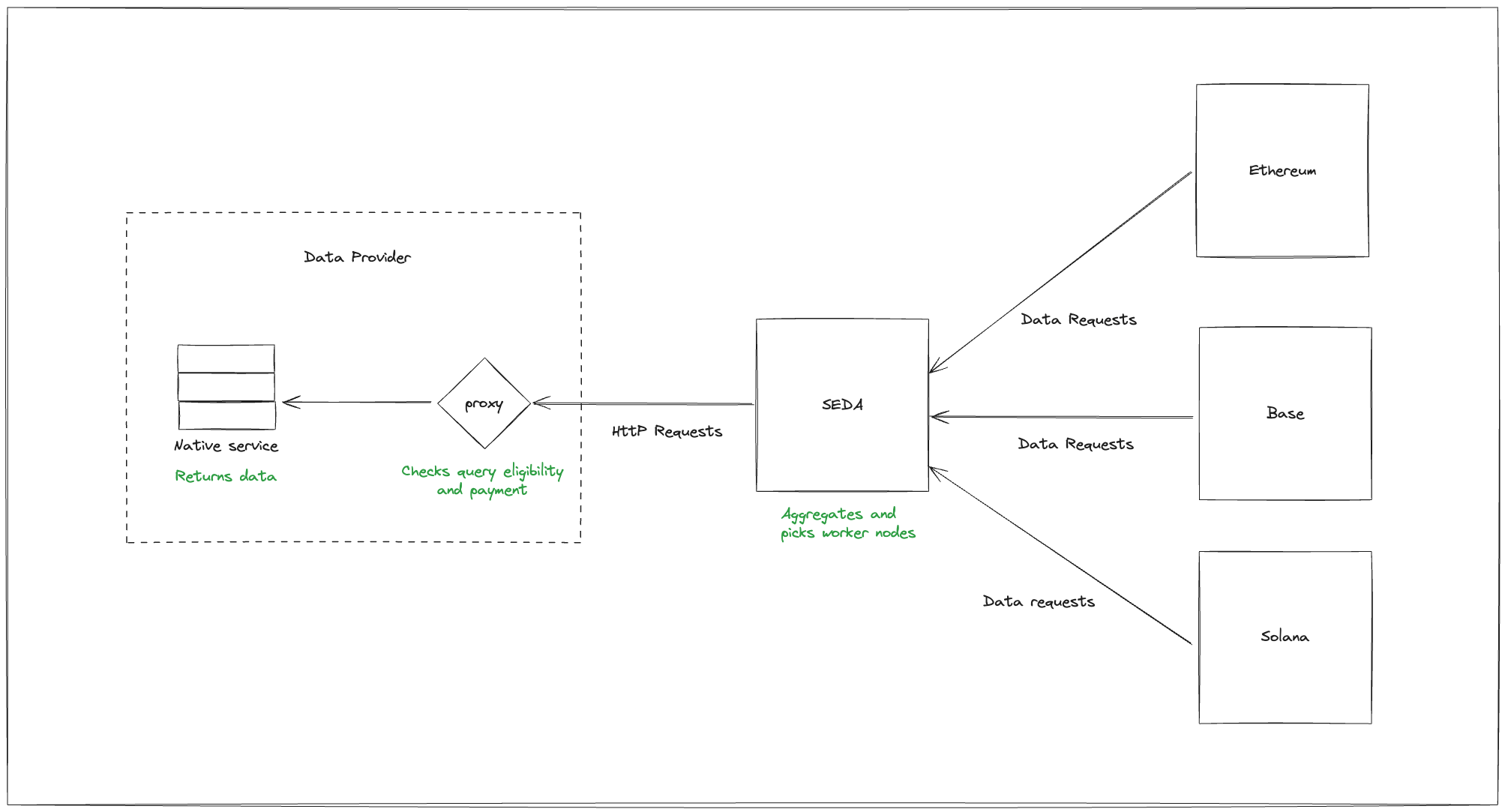
A Data proxy is a simple middleware component that acts as a pipeline or connector between any API and the SEDA network by holding an API key that has access to the data provider’s services.
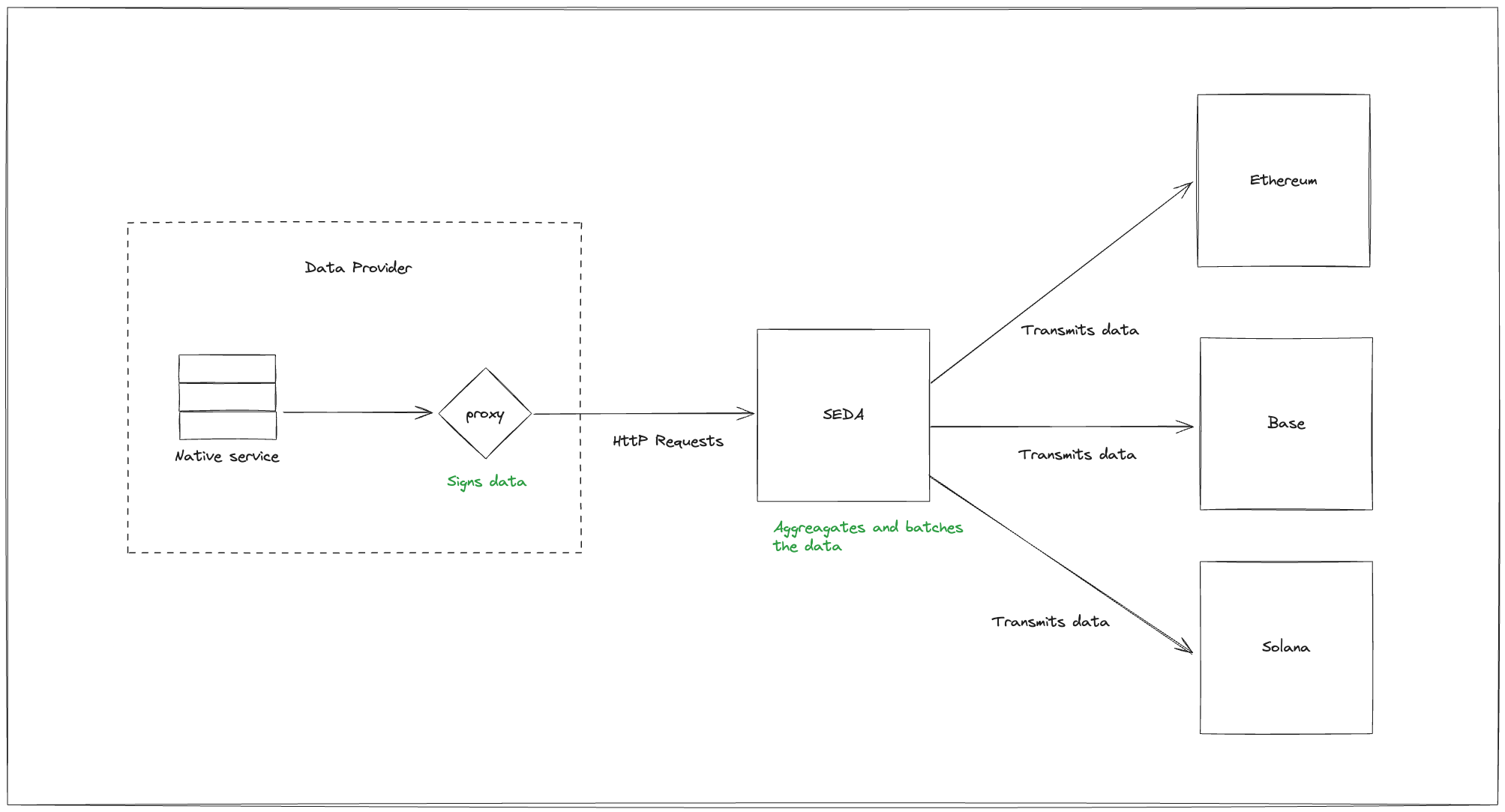
Additionally, Data Proxies verify conditions to inbound HTTP requests, checking that the requester is part of the SEDA network and that if applicable the provider’s fees have been paid. Additionally, they allow providers to add an SECP private key to the proxy, which would be used to sign the data before it’s forwarded back to the requester, adding additional security and verifiability.
In the end, the proxy nodes allow data providers to expose their entire suite of APIs through a single, one-time deployment and when applicable earn value based on onchain demand with minimal technical overhead or maintenance.
#### Request Flow
How data is requested via the SEDA Network.
#### Response Flow
How data is served from the Data Proxy to the SEDA Network.
### System Requirements
The Data Proxy implementation is lightweight, allowing it to run with minimal infrastructure requirements:
* Compute: 2 vCPU
* Memory: 1 GB RAM
* Storage: 100 MB for the binary (approx. 3 GB GNU/Linux instance)
The Data Proxy efficiently handles hundreds of requests per second, providing latency and throughput that are well-suited to meet current and near-future SEDA protocol demands.
#### **Scaling Up**
If performance needs to be boosted beyond vertical scaling, horizontal scaling is straightforward due to its minimal resource footprint. Depending on your existing infrastructure, consider the following strategies:
* Load Balancing: Use tools like AWS ELB, NGINX, or HAProxy to distribute traffic across multiple proxy nodes.
* Auto-Scaling: Implement cloud-based auto-scaling groups (e.g., Amazon EC2 Auto Scaling) to dynamically adjust instance counts based on traffic.
* Container Orchestration: Utilize Kubernetes or managed services such as Amazon EKS/Fargate for efficient management and scaling of containerized instances.
These approaches ensure that your Data Proxy deployment remains scalable and resilient, adapting seamlessly to varying workloads.
### Operating and Running a Data Proxy
Below is a step-by-step guide to initializing and running a Data Proxy to the SEDA Network
#### **Prerequisites**
Install Bun:
```bash
curl -fsSL https://bun.sh/install | bash
```
Clone the Data Proxy directory:
```bash
git clone https://github.com/sedaprotocol/seda-data-proxy.git ./my-project
```
Install the project dependencies:
```bash
cd ./my-project
bun install
```
Checkout the CLI commands:
```bash
bun start --help
```
#### **Preparing a Data Proxy Node**
{% hint style="info" %}
Note: The SEDA network won't be able to access your proxy node unless you expose it on a public IP or domain.
{% endhint %}
Start by generating the `config.json` (mandatory) and `data-proxy-private-key.json`. The private key will be used for for signing data. It can also be passed with the following environment variable: `SEDA_DATA_PROXY_PRIVATE_KEY`. The environment variable takes precedence over the default key file, but when an explicit key file is specified that will take precedence.
```bash
bun start init
```
```json
{
"routeGroup": "proxy", // Will host at myproxy.com/proxy
"routes": [
{
"path": "/*",
"upstreamUrl": "https://myapi.com/endpoint/{*}", // {*} will be string replaced with user's api endpoint
"headers": {
"x-api-key": "MY-API-KEY",
"accept": "application/json"
}
}
]
}
```
#### Registering a Node
Next you'll need to register your data proxy on the SEDA network. This can be done through a CLI command which will create a transaction for you which you can submit through the SEDA explorer.
```sh
bun start register
```
* `payout_address`: Required. The SEDA address on which you would like to receive the payout for provided services.
* ``: Required. The amount of SEDA you want to charge per request.
* `--memo`: Optional. Free form text you can attach to your data proxy registration.
Clicking on the link will take you to the SEDA explorer where you can double check the attributes before connecting a wallet and signing the transaction. The address of the wallet which signed the transaction will be the admin of the data proxy: they're able to change the `payout_address`, `memo`, and submit fee updates. Admin ownership can be changed through the explorer by submitting a transaction.
#### Example invocation and output:
```sh
$ bun start register seda1lyfkj6xwecq3462qa683s78weexhp7d72ku3qf 1
# Should output something like the following
Fee amount: 1 SEDA (1000000000000000000aseda)
Payout address: seda1lyfkj6xwecq3462qa683s78weexhp7d72ku3qf
Signed hash: ddca6a941e3db1e30aefb00816636bdf9346a103ec1ac7926036867d6a7e7889
Public key: 0267f09f7a6b1f0be3458edd1aab59d00a4f7e827cd9a37624f94642f5ebd8e82c
Signature: b0e4b8ee137c983a74d07d21533d4b9119abb7cc82fb6ba0bc43a08cacb9c55777de3552ad4f7fab397e214b39114ca88951d6a1d54bdbe4db921955bc498169
Signature recovery id: 1
Submit your transaction on:
https://devnet.explorer.seda.xyz/data-proxy/register?fee=1000000000000000000aseda&payoutAddress=seda1lyfkj6xwecq3462qa683s78weexhp7d72ku3qf&publicKey=0267f09f7a6b1f0be3458edd1aab59d00a4f7e827cd9a37624f94642f5ebd8e82c&signature=b0e4b8ee137c983a74d07d21533d4b9119abb7cc82fb6ba0bc43a08cacb9c55777de3552ad4f7fab397e214b39114ca88951d6a1d54bdbe4db921955bc498169&recoveryId=1&memo=
```
#### Verifying Data Proxy Configuration
Before starting the data proxy, you can run the validation command to make sure that it has been set up properly. Run the command with the --silent flag to get summary information.
```
bun run start validate
```
#### Running a Data Proxy
To start your proxy execute the following command:
```bash
bun start run
# The console will output something similiar:
2024-08-19 13:21:46.624 info: Proxy routes is at
```
Your proxy is now running and ready to receive requests from the SEDA network.
#### Debugging
By default the data proxy node will validate that incoming requests originate from the SEDA network by eligible entities. If you want to verify everything is set up correctly you can pass the `--disable-proof` flag when starting the binary; this disables all incoming request verification on the proxy.
```sh
# Start the proxy without the request proof mechanism so it's easier to debug
bun start run --disable-proof
```
### **Configuration**
#### Route Group
All proxy routes are grouped under a single path prefix, by default this is "proxy". You can change this by specifying the `routeGroup` attribute in the config.json:
```json
{
"routeGroup": "custom",
// Rest of config
}
```
#### Base URL
In case you want to have software in front of the data proxy to handle the request (such as another proxy or an API management solution) it's possible that the public URL of the data proxy is different from the URL that the data proxy services. This causes a problem in the tamper proofing mechanism since the data proxy needs to sign the request URL, in order to prove that the overlay node did not change the URL. To prevent this you can specify the `baseURL` option in the config.json:
```json
{
"routeGroup": "proxy",
"baseURL": "https://my-public-data-proxy.com"
}
```
{% hint style="warning" %}
Just the protocol and host should be enough, no trailing slash.
Should you do additional path rewriting in the proxy layer you can add that to the `baseURL` option, but this is not recommended.
{% endhint %}
#### Multiple Routes
A single data proxy can expose different data sources through a simple mapping in the `config.json`. The `routes` attribute takes an array of proxy route objects which can each have their own configuration.
The two required attributes are `path` and `upstreamUrl`. These specify how the proxy should be called and how the proxy should call the upstream. By default a route is configured as `GET`, but optionally you can specify which methods the route should support with the `method` attribute.
```json
{
"routeGroup": "proxy",
"routes": [
{
"path": "/eth-usd",
"upstreamUrl": "https://myapi.com/eth-usd"
// Default method is GET
},
{
"path": "/btc-usd",
"upstreamUrl": "https://myapi.com/btc-usd",
// You can set multiple methods for the same route
"method": ["GET", "HEAD"]
},
],
}
```
{% hint style="warning" %}
The `OPTIONS` method is reserved and cannot be used for a route.
{% endhint %}
#### Base URL per route
In addition to specifying the `baseURL` at the root level you can also specify it per `route`. The `baseURL` at the `route` level will take precedence over one at the root level.
```json
{
"routeGroup": "proxy",
"baseURL": "https://data-proxy.com",
"routes": [
{
// This route will use the "baseURL" from the root
"path": "/eth-usd",
"upstreamUrl": "https://myapi.com/eth-usd"
},
{
// This route will use its own "baseURL"
"baseURL": "https://btc.data-proxy.com",
"path": "/btc-usd",
"upstreamUrl": "https://myapi.com/btc-usd"
},
],
}
```
### Upstream Request Headers
Should your upstream require certain request headers you can configure those in the `routes` object. All headers specified in the `headers` attribute will be sent to the upstream in addition to headers specified by the original request.
```json
{
"routeGroup": "proxy",
"routes": [
{
"path": "/eth",
"upstreamUrl": "https://myapi.com/endpoint/eth",
"headers": {
"x-api-key": "MY-API-KEY",
"accept": "application/json"
}
}
]
}
```
#### **Environment Variable Injection**
Sometimes you don't want to expose your API key in a config file, or you have multiple environments running. The data proxy node has support for injecting environment variables through the `{$MY_ENV_VARIABLE}` syntax to the headers or the upstream URL.
```json
{
"routeGroup": "proxy",
"routes": [
{
"path": "/odds",
"upstreamUrl": "https://swapi.dev/api/my-odds",
"headers": {
"x-api-key": "{$SECRET_API_KEY}",
},
},
],
}
```
{% hint style="warning" %}
Environment variables are evaluated during startup of the data proxy. If it detects variables in the config which aren't present in the environment the process will exit with an error message detailing which environment variable it was unable to find.
{% endhint %}
#### **Path Parameters**
The `routes` objects have support for path parameter variables and forwarding those to the upstream. Simply declare a variable in your path with the `:varName` syntax and reference them in the upstreamUrl with the `{:varName}` syntax. See below for an example:
```json
{
"routeGroup": "proxy",
"routes": [
{
"path": "/:coinA/:coinB",
// Use {} to inject route variables
"upstreamUrl": "https://myapi.com/{:coinA}-{:coinB}"
},
],
}
```
#### **Forwarding Response Headers**
By default the data proxy node will only forward the `content-type` header from the upstream response. If required you can specify which other headers the proxy should forward to the requesting client:
```json
{
"routeGroup": "proxy",
"routes": [
{
"path": "/planets/:planet",
"upstreamUrl": "https://swapi.dev/api/planets/{:planet}",
// Now the API will also return the server header from SWApi
"forwardResponseHeaders": ["content-type", "server"],
"headers": {
"x-api-key": "some-api-key",
},
},
],
}
```
#### **Wildcard routes**
The Data Proxy node has support for wildcard routes, which allows you to quickly expose all your APIs:
```json
{
"routeGroup": "proxy",
"routes": [
{
// The whole path will be injected in the URL
"path": "/*",
"upstreamUrl": "https://swapi.dev/api/{*}",
"headers": {
"x-api-key": "some-api-key",
},
},
],
}
```
#### **JSON path**
If you don't want to expose all API info you can use `jsonPath` to return a subset of the response:
```json
{
"routeGroup": "proxy",
"routes": [
{
"path": "/planets/:planet",
"upstreamUrl": "https://swapi.dev/api/planets/{:planet}",
// Calling the API http://localhost:5384/proxy/planets/1 will only return "Tatooine" and omit the rest
"jsonPath": "$.name",
"headers": {
"x-api-key": "some-api-key",
},
},
],
}
```
#### Status Endpoint
The Data Proxy node has support for exposing status information through some endpoints. This can be used to monitor the health of the node and the number of requests it has processed.
The status endpoint has two routes:
* `/status/health`\
Returns a JSON object with the following structure:
```json
{
"status": "healthy",
"metrics": {
"uptime": "P0Y0M1DT2H3M4S", // ISO 8601 duration since the node was started
"requests": 1024, // Number of requests processed
"errors": 13 // Number of errors that occurred
}
}
```
* `/status/pubkey`\
Returns the public key of the node.
```json
{
"pubkey": "031b84c5567b126440995d3ed5aaba0565d71e1834604819ff9c17f5e9d5dd078f"
}
```
#### Status Configuration
The status endpoints can be configured in the config file under the `statusEndpoints` attribute:
```json
{
// Other config...
"statusEndpoints": {
"root": "status",
// Optional
"apiKey": {
"header": "x-api-key",
"secret": "some-secret"
}
}
}
```
* `root`: Root path for the status endpoints. Defaults to `status`.
* `apiKey`: Optionally secure the status endpoints with an API key. The `header` attribute is the header key that needs to be set, and `secret` is the value that it needs to be set to.\
The `statusEndpoints.apiKey.secret` attribute supports the `{$MY_ENV_VARIABLE}` syntax for injecting a value from the environment during start up.
---
# Agent Instructions
This documentation is published with GitBook. GitBook is the documentation platform designed so that both humans and AI agents can read, navigate, and reason over technical content effectively. Learn more at gitbook.com.
## Querying This Documentation
If you need additional information that is not directly available in this page, you can query the documentation dynamically by asking a question.
Perform an HTTP GET request on the current page URL with the `ask` query parameter, and the optional `goal` query parameter:
```
GET https://docs.seda.xyz/home/for-developers/define-your-data-source/accessing-a-private-api.md?ask=&goal=
```
`ask` is the immediate question: it should be specific, self-contained, and written in natural language.
`goal` is optional and describes the broader end goal you are ultimately trying to accomplish on behalf of the user. GitBook uses it to tailor the answer towards what is most useful for that goal.
The response will contain a direct answer to the question and relevant excerpts and sources from the documentation.
Use this mechanism when the answer is not explicitly present in the current page, you need clarification or additional context, or you want to retrieve related documentation sections.